MenuAction
- class pygamelib.gfx.ui.MenuAction(title: Text = None, action=None, parameter=None, padding: int = 1, config: UiConfig = None)
Bases:
objectA menu action is a menu entry that executes a callback when activated. Usually a Menuaction represents an action from the user interface like open file, save, quit, etc.
Therefor a MenuAction is fairly simple, at its simplest it has a title and a callable reference to a function.
An action cannot be used by itself but can be added to a
MenuBaror aMenu.Like everything in the UI module, MenuAction are styled through a
UiConfigobject. Unlike the other classes of that module however, the configuration object is not mandatory when instanciating this class. The reason is that theMenuBarobject impose the configuration to its managedMenuActionandMenu.- __init__(title: Text = None, action=None, parameter=None, padding: int = 1, config: UiConfig = None) None
The constructor takes the following parameters.
- Parameters:
title (str |
Text) – The title of the action (i.e: its label)action (callable) – A reference to a callable function that is going to be executed when the action is activated. If set to None, nothing will happen when the action is activated.
parameter (Any) – A parameter that is passed to the callback action if not None.
padding (int) – The horizontal padding, i.e the number of space characters added to the left and right of the action.
config (
UiConfig) – The configuration object.
Example
menubar = MenuBar(config=UiConfig.instance())
file_menu = Menu(
    "File",
    [
        MenuAction("Open", open_file),
        MenuAction("Save", save_file),
        MenuAction("Save as", save_file_as),
        MenuAction("Quit", exit_application),
    ]
)
menubar.add_entry( file_menu )
menubar.add_entry( MenuAction("Help", display_help) )
screen.place(menubar, 0, 0)
screen.update()
Methods
__init__([title, action, parameter, ...])The constructor takes the following parameters.
activate()Execute and return the result of the callback.
render_to_buffer(buffer, row, column, ...)Render the object from the display buffer to the frame buffer.
Return the actual width of the action's title.
Attributes
Get / set the action's callback, it needs to be a callable.
Get / set the config of the MenuAction, it needs to be a
UiConfig.Get / set the padding before and after the menu action, it needs to be an int.
Get / set the selected of the MenuAction, it needs to be a boolean.
Get / set the title of the action, it needs to be a str or a
Textobject.- property action
Get / set the action’s callback, it needs to be a callable.
- activate()
Execute and return the result of the callback.
Example:
file_save_action.activate()
- property padding
Get / set the padding before and after the menu action, it needs to be an int.
- render_to_buffer(buffer, row: int, column: int, buffer_height: int, buffer_width: int) None
Render the object from the display buffer to the frame buffer.
This method is automatically called by
pygamelib.engine.Screen.render().- Parameters:
buffer (numpy.array) – A screen buffer to render the item into.
row (int) – The row to render in.
column (int) – The column to render in.
height (int) – The total height of the display buffer.
width (int) – The total width of the display buffer.
- property selected: bool
Get / set the selected of the MenuAction, it needs to be a boolean.
This changes the representation (way it’s drawn) of the menu entry.
- property title: Text
Get / set the title of the action, it needs to be a str or a
Textobject.The title is used in the
Menu. In the following image, the title of the first action in the expanded menu is “Open”, followed by “Save”.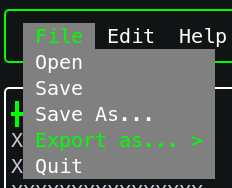
- title_width()
Return the actual width of the action’s title. This takes into account the padding.
Example:
menu_action.title_width()